CRM / People first. Progress follows.

CRM software for sales and lead managementEvery lead.
A new chapter.

From the first enquiry to the next opportunity, give your team one place to manage leads, conversations, follow-ups, and progress.

Take the tour
A little closer. Every day.
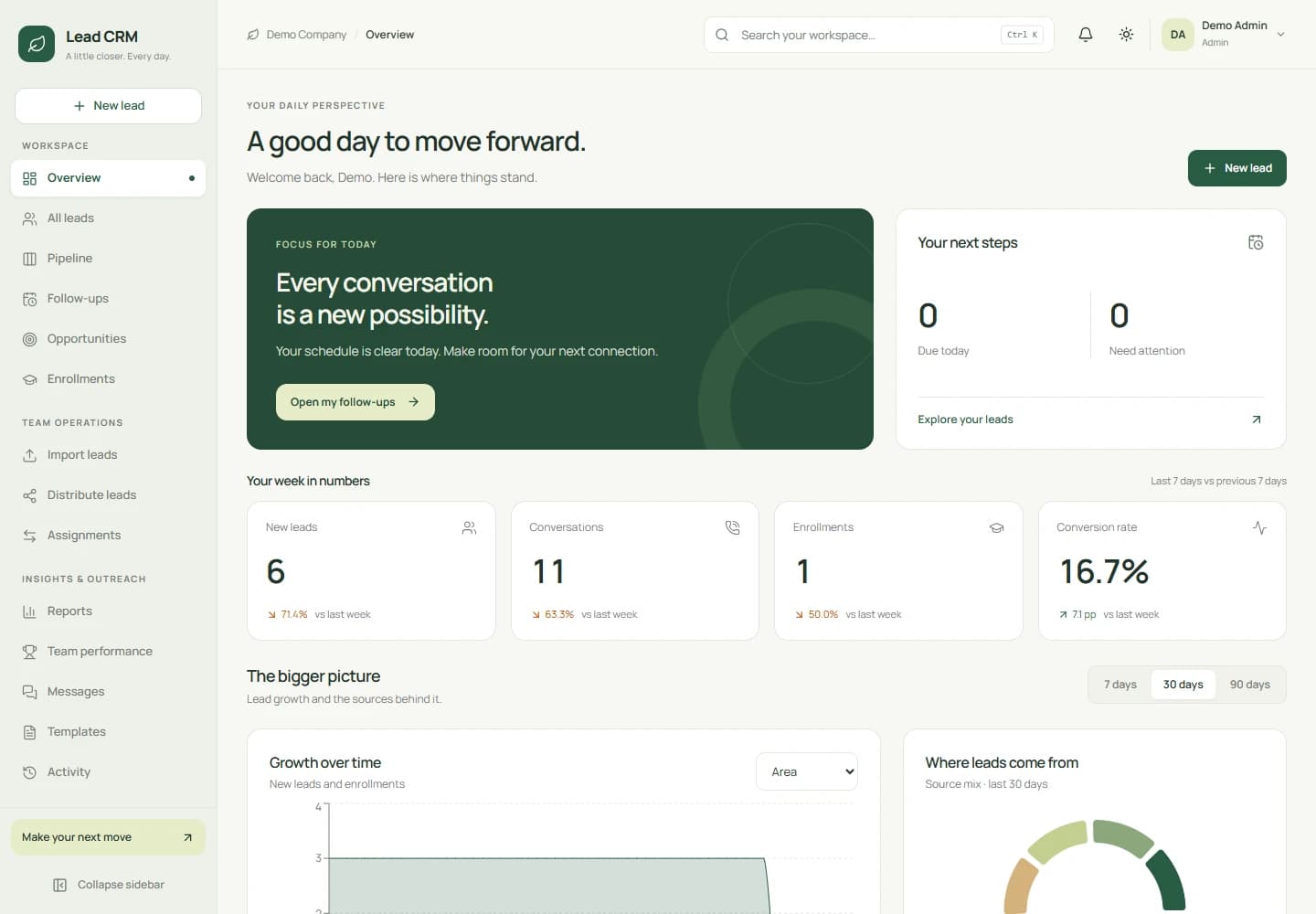
CRM dashboard showing daily priorities, lead metrics, and source insights
THE ACTUAL PRODUCT. A REAL LOOK INSIDE.Demo workspace shown

What is CRM?

By The Beyond Horizon · Features reviewed

CRM by The Beyond Horizon is web-based customer relationship management software for managing leads, sales pipelines, follow-ups, and team activity. It brings contact records, lead distribution, calls, communication history, opportunities, and performance reports into one company workspace. Agents, managers, and admins work with visibility and permissions suited to their responsibilities.

// Built for better relationships

The whole journey.
One workspace.

Capture leads, share the workload, follow up with context, and track opportunities. CRM connects the daily work of your company’s agents, managers, and admins.

01

Every relationship, in context

Keep contact details, source, priority, ownership, and internal notes in one lead record.

  • Duplicate mobile protection
  • Hot, warm, and cold priorities
  • Search, advanced filters, and bulk updates
02

From CSV to a working team

Import up to 5,000 rows per file, then distribute unassigned leads evenly across selected active users.

  • Preview rows and review import issues
  • Skip duplicates without replacing existing leads
  • Round robin, batch filters, and lead transfers
03

A pipeline you can move

See leads by stage and move them with drag and drop. Track opportunities from first conversation to outcome.

  • Configurable stages and colours
  • Open, won, and lost opportunities
  • Opportunity amounts and weighted forecasts
04

Every conversation remembered

Log inbound and outbound calls with outcomes, duration, and notes. Keep the full lead history close at hand.

  • Contact attempts and last-contacted tracking
  • Callback follow-ups while logging calls
  • Timeline of edits, assignments, and activity
05

The next step stays visible

Create lead-linked tasks, assign an owner, and see today’s, missed, upcoming, and completed follow-ups.

  • Due dates and assignee filters
  • Complete or cancel tasks
  • Pending follow-ups cancelled on enrolment
06

Personal outreach, shared context

Compose email, SMS, and WhatsApp messages from the lead workspace with reusable, personalised templates.

  • Name, course, university, and agent placeholders
  • Central message log and delivery status
  • Do Not Disturb respected for message actions
07

Fee and balance tracking

Track fees, cumulative paid amounts, and outstanding balances. The demo shows this module through an education enrolment register.

  • Fees, collections, and outstanding balances
  • Configured won stage on enrolment
  • Credit preserved for the original enrolling user
08

See what is working

Review weekly KPIs, source trends, conversion reports, and agent performance within each user’s access.

  • Reports by stage, source, owner, university, or city
  • Calls, talk time, follow-ups, and collections
  • Date ranges and CSV exports

// Product screenshots

A look inside CRM.

Explore the dashboard, lead list, pipeline, and reports. The gallery also includes the login screens.

CRM dashboard showing daily priorities, lead metrics, and source insights

Start the day with a clear next step.

See follow-ups, recent activity, lead growth, and conversion trends in one daily view.

Screenshots use an education sales example. Demo figures illustrate the interface.

// From first contact to opportunity

A journey your whole team can follow.

Keep the next step visible at every stage, with shared context for the people doing the work.

  1. 01

    Capture

    Create an enquiry or import a CSV. Duplicate mobile checks keep existing leads intact.

  2. 02

    Connect

    Distribute leads, log call outcomes, and set the next follow-up with a clear owner.

  3. 03

    Progress

    Move leads through configured stages and track opportunity value and expected close dates.

  4. 04

    Review

    Track won and lost opportunities, review conversion reports, and see where to focus next.

// Built around your team

Clear ownership.
Room to manage.

Each role gets the lead visibility and tools its work requires. Managers coordinate their teams; admins shape the processes behind them.

Agents

Work assigned leads, record calls and messages, manage follow-ups, and track opportunities, enrolments, and paid amounts.

Managers

See their own leads, their direct team’s leads, and the unassigned pool. Import, distribute, transfer, and rechurn leads, then review agent performance.

Admins

Oversee all leads, manage users and reporting relationships, and configure sources, universities, courses, stage funnels, and message templates.

Outreach that fits the workflow

Email can be sent through Resend when configured. SMS and WhatsApp use message logging and links to the device’s SMS app or WhatsApp chat. Calls use the device dialler with manual logging.

Connect the next step

A configured Lead Post webhook sends selected lead details to your external system and records the response. Optional browser follow-up reminders require Firebase and a reminder scheduler.

// Questions & answers

CRM,
explained.

What is CRM by The Beyond Horizon?

CRM is web-based customer relationship management software for sales and lead management. It connects contact records, lead distribution, calls, follow-ups, opportunities, communication history, and performance reports in one company workspace.

Who is this CRM designed for?

It is designed for company teams that need to organise leads, coordinate follow-ups, and track sales opportunities. Agents work assigned leads, managers coordinate their direct teams and the unassigned pool, and admins oversee leads, users, stages, and templates.

Can we import and automatically distribute leads?

Yes. Managers and admins can import up to 5,000 rows per CSV file, preview sample rows, and review invalid and duplicate entries. Existing leads are preserved when duplicate mobiles are found. Unassigned leads can be distributed evenly by round robin across selected active users, with filters for upload batch, source, or stage.

How does the CRM manage calls and follow-ups?

Users manually log call outcomes, duration, and notes, and can create callback follow-ups while logging a call. Lead-linked tasks have due dates and assignees, with views for today’s, missed, upcoming, and completed follow-ups. Optional browser reminders require Firebase configuration, user permission, and a scheduler.

Can the CRM track fees and outstanding balances?

Yes. The current fee-tracking module records fees, cumulative paid amounts, and balances through an enrolment register. The education demo links these records to a university and course. Payment gateway processing and a transaction-by-transaction payment ledger are not included.

Does it send email, SMS, and WhatsApp messages?

Email can be sent through Resend when configured; otherwise the CRM logs the message and offers a mail-app link. SMS and WhatsApp use message logging and links to the device’s SMS app or WhatsApp chat for sending. Server SMS delivery and WhatsApp Business API delivery require additional implementation. Message actions respect Do Not Disturb settings.

What reports can a sales manager see?

Lead reports group records by stage, source, owner, or city; the education demo also includes university grouping. Reports show lead counts, contacted and lost leads, and conversion figures for a selected date range. Agent reports include allotted leads, calls, connected calls, talk time, completed follow-ups, and the demo’s enrolments and collections. Reports respect user access and can be exported as CSV.

Can we configure lead stages and message templates?

Yes. Admins can manage lead sources, funnels, stages, sub-stages, and message templates. Stages can be ordered, coloured, and marked as won or lost to match the company’s lead workflow. The education demo also includes university, course, and course-fee configuration.

How can we request a CRM demo or pricing?

Use the Request a demo button on this page or contact The Beyond Horizon to discuss your sales workflow and pricing. The page does not list a public price or provide public access to the demo workspace.
Explore our other software products or contact The Beyond Horizon to discuss your sales workflow.

// Your next chapter

Make room for
better relationships.

Let us walk you through CRM and talk about how your team works.